
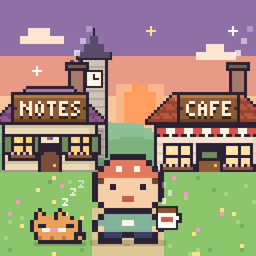
Your tiny town
of productivity.
A sleepy pixel town that wakes up while you get things done.
Tasks become letters.
Type it like you'd say it. Pip works out the day, the time and the repeat, then carries it through town as a letter.
Notes become a book.
Every note is a page in Mo's book: writing, pen drawings, photos, sticky notes and checklists.
Focus becomes a café.
Order a drink, take a seat and work beside the regulars. When the round ends, take a break, wander the café and chat with Bea.
Habits grow into plants.
Water a habit each day and watch it sprout, bud and bloom. Your streak lives in the leaves.
Focus bakes treats.
Every focus session bakes a treat. Have one on a break, gift one to a friend, or save three to rescue a streak.
Your tray is empty.
Questions,
answered.
What is Workdoro?
Workdoro is a cozy pixel-art productivity app for iPhone and iPad. It's a tiny town where every building is a tool: your to-do list lives at the post office, your notes at the library, your focus timer at the café and your habit tracker in the greenhouse. As you get things done, the sleepy town comes back to life.
Is Workdoro a Pomodoro timer?
Yes. The café is a Pomodoro-style focus timer. Order a drink, pick a seat and set your own rounds, like 25/5 or 50/10. On breaks you can wander the café and chat with Bea and the regulars. Strict mode turns your phone sideways into a quiet desk, and a Live Activity and the Dynamic Island show your time while you focus.
Can I use it as a to-do list?
Yes. Give Pip your tasks and he carries them as letters. Type naturally, like “call mom friday 6pm” or “gym every monday 7am”, and Workdoro works out the date, time and repeat for you. You can tick tasks off right from the home screen widget.
Does it track habits and streaks?
Yes. Every habit grows into a real plant in the greenhouse. Water it each day and watch it sprout, bud and bloom. You can see your streaks, your best run and a calendar of every day you showed up. Focus sessions bake treats, and three treats can rescue a broken streak.
Can I take notes in Workdoro?
Yes. Mo keeps your notes as pages of her book. Write, draw with pens, add photos, sticky notes, shapes and checklists, or start from templates for journals, meetings and brainstorms. Pin notes, sort them into folders and search everything.
Does Workdoro work on iPad?
Yes. Workdoro runs on iPhone and iPad, and your town syncs between them with iCloud. It also has home screen widgets for your letters, café time and habit streaks.
Is Workdoro private?
Yes. There's no account, no ads and no tracking. Your tasks, notes and habits stay on your device and in your own iCloud, and we never see them.
Is Workdoro free?
Workdoro is free to download on the App Store for iPhone and iPad.